Changelogs
Stay up to date with the latest changes and enhancements.
Stay up to date with the latest changes and enhancements.

Stay up to date with the latest changes and enhancements.
14. Sep 2026
Share
Released 10 September 2026
Every published version of the portier Vision 5 software is built and tested in a defined development and release process and formally approved before delivery. Functional and regression tests are completed before every release.
portier Global Pty Ltd operates an information security management system certified to ISO/IEC 27001:2022. The development, delivery and support of Vision 5 fall within its scope.
The current ISO/IEC 27001:2022 certificate and further compliance documentation are available in our Trust Center: https://trust.portierglobal.com
If you need further information or specific evidence, we are happy to provide it. Write to us at [email protected].
Vision 5.8.1 moves the connection to SQL Server and Azure SQL onto the current Microsoft ODBC driver, which the setup now installs itself. It also brings noticeably faster workflows on cloud-hosted databases, fixes to CAD plans and cylinder management, and an audit trail that tidies itself up.
Current database driver for SQL Server and Azure SQL: Vision now connects through the Microsoft ODBC Driver 18 for SQL Server. Microsoft has discontinued the previous SQL Server Native Client, and it is no longer included in Windows Server 2025, where connecting could fail. If the driver is missing, Vision now says so clearly and in your language, instead of showing a generic connection error. Installations on Firebird are not affected. Connections over long network distances and to Azure are also more robust, and administrators can see on the database server which session belongs to Vision.
One setup for Vision and the driver: Installation and updates now run through a single setup program with a portier dialog in German and English. It installs the database driver first and then Vision, so a separate driver installation is no longer needed. If you use Firebird, untick the driver. The choice is remembered and also applies to later automatic updates. A driver that is already installed is skipped. Updates need Windows administrator rights. Without them, the installed version keeps running unchanged and the update dialog refers you to your IT.
Send status of reminder emails: The reminder overview under People can show two additional columns, "Earlier reminder" and "Final reminder". Once a reminder has actually been sent for a key, the column shows the send date with the note "Email sent". Until then it stays empty. Dry runs do not count as sent. Anyone who has already received a reminder always appears in the list, even if their leaving date lies outside the configured time window. Switch it on under Settings > Manage modules. With the switch off, the form stays unchanged.
Keys and cylinders with many entries open instantly: A key with 1,675 copies took around 48 seconds to appear. The form now opens in under a second. The same applies to cylinders with a long installation history and to deleting such keys.
Detail forms without waiting: Users, buildings, locking systems, sets and cylinders now load their lists in a few queries instead of one query per row. How long a form takes to open no longer depends on the amount of data.
The locking plan opens and scrolls smoothly: The locking plan now reads its settings and the locking matrix once, instead of several times for every visible row. Most noticeable on cloud-hosted databases.
CAD plans with many cylinders: A plan with 100 cylinders used to spend 15 to 40 seconds on database access before it was drawn. It now loads all cylinders in a single query.
Reports and handover printing: Reports that show copy counts per key loaded these values row by row, so a report covering a few hundred keys could take a minute or longer. They now load in a single pass. Printing a key issue or return also starts straight away, instead of reading the whole settings table every time.
Extension orders: Building an extension order now reads the values it needs for the whole locking system up front, instead of key by key. Large locking systems are now ready almost as quickly as small ones.
Starting with a paused cloud database: Databases on a serverless plan pause after a longer period of inactivity and need a few seconds on the next access. Vision used to treat this as a connection error, so the start failed and only worked on the second attempt. Vision now shows a notice while it waits and gives the database up to a minute. Local installations are not affected.
Cylinders without a manufacturer ID on Firebird: On Firebird, only the first cylinder without a manufacturer ID (Fremd-ID) could be saved, and every further one was rejected. Because the same check also ran when editing, sites whose cylinders were all entered by hand could eventually not save any cylinder change at all. Empty manufacturer IDs are now stored as "not set", so any number of cylinders without a manufacturer ID is possible. The protection against two cylinders with the same real manufacturer ID remains. SQL Server and Azure were never affected. The update also cleans up existing databases, so no manual follow-up is needed.
Placing and correcting cylinders on CAD plans: Some drawings open on a print sheet (paper space) instead of the model area, depending on how the architect last saved the file. A cylinder dropped there stored page coordinates as its building position, so the marker reappeared in empty space and could no longer be detached on the plan. CAD plans now always open in the model area, dropping a cylinder on a print sheet is refused with a message, and a cylinder that is already placed can be moved by dragging it.
CAD plans that cannot be displayed: A damaged or unsupported drawing used to pass the save check and then crashed every time it was opened. Only what the CAD engine can actually load is now saved, checked when the file is selected and again before saving. Plans that are already affected open with a clear message naming the plan and the cause, and can be replaced with "Replace CAD plan" or deleted.
Duplicate cylinders when changing status: Switching between "Installed" and "In stock" could cause the next save to create a second, identical cylinder instead of updating the existing one. The same fault occurred when changing the building, locking system, door number or room description. The existing record is now always saved. Duplicates that already exist are not changed by this and still need to be cleaned up.
Cylinder dimensions in the locking system import (XML): If your locking system manufacturer's software writes the dimensions in German notation with a decimal comma, that is 31,5 instead of 31.5, Vision did not read the value and assumed 0. A newly created cylinder was saved with this 0. For a cylinder recognised by its manufacturer ID (Fremd-ID) the value was discarded, so the old value remained. In both cases the import reported success. Both notations are now read. Importing the same file again fills in the dimensions, and your locking system manufacturer does not need to create it again. Only cylinders that the import recognises by their manufacturer ID are updated. Cylinders matched in any other way keep their previous value and still need to be corrected by hand.
Failed order was reported as saved: If one line of an order could not be saved, Vision still booked the order and reported success, leaving it half-saved or with old quantities. The whole save is now rolled back, header and lines together. The screen and the database match again.
Licence activation with an expired one-time code: If the code entry stayed open beyond its ten-minute validity, entering the code or requesting a new one could crash the application. A late code is now rejected as invalid, and a new one can be requested.
The audit trail tidies itself up: Entries older than the retention period are removed daily in small steps, so the trail does not grow without limit. The retention period is two years by default and can be adjusted per installation by portier support, without reinstalling. A value of zero keeps everything. Users whose account was deleted more than 90 days ago are anonymised in the trail. Their name is replaced with "GELOESCHT" and their personal details are masked, while the record of what was changed, when and through which database account is kept. Beyond that, an audit entry still cannot be changed or deleted.
From this version, installations on SQL Server and Azure SQL need the Microsoft ODBC Driver 18 for SQL Server on every computer that runs Vision. The new setup includes it. If your IT distributes Vision centrally, add the driver yourself as before. Firebird installations are not affected.
Vision 5.8.1 extends the database schema. The update runs automatically on first start, for Firebird and MSSQL installations alike. Updates through the setup need Windows administrator rights. As always, take a backup first.
CAD plans now always open in the model area, even if the drawing was last saved on a print sheet. You can still select a sheet from the layout list before printing.
26. Jun 2026
Share
Every published version of the portier Vision 5 software is built and tested in a defined development and release process and formally approved before delivery. Functional and regression tests are completed before every release.
portier Global Pty Ltd operates an information security management system certified to ISO/IEC 27001:2022. The development, delivery and support of Vision 5 fall within its scope.
The current ISO/IEC 27001:2022 certificate and further compliance documentation are available in our Trust Center: https://trust.portierglobal.com
If you need further information or specific evidence, we are happy to provide it. Write to us at
Vision 5.7.1 brings the portier Vision Companion into Vision: automatic personnel sync from Microsoft Entra ID, a reworked data import, and scheduled background jobs, alongside fully translated reports, sorting across all pages, and stronger security.
Personnel sync from Microsoft Entra ID: Through the companion, Vision keeps your personnel list in step with your Entra ID (Azure AD) directory. A guided wizard handles setup, you map the fields yourself, and the first run previews matches and reuses existing people instead of creating duplicates.
Reworked personnel import: The import now detects column headers, date format and file encoding on its own, shows a preview before writing, saves reusable presets, and reports any row it cannot import with the reason.
Scheduled jobs in the companion: The companion can run data exports, e-mail reminders and retention rules on a schedule, each with a dry run first and a record of every run.
The companion ships with Vision: It is installed together with Vision and opens from the Vision menu using your existing login, with no second sign-on.
Reports and printouts in your language: Printouts in English, Spanish, French and Dutch no longer carry German remnants. Vision now also translates its own status values such as key status, closure type and item status, along with report titles and headings, while leaving your own lookup values untouched.
Translated startup dialogs: Seven startup and activation dialogs that used to appear only in English now follow the user's language.
Sorting across all pages: A column-header click in the key, cylinder or bundle list sorts the whole list, not just the rows on screen, with natural number order, and letter-prefixed keys kept together.
Faster with cloud databases: Common operations such as reminders, search and handover printing now reach the database less often, which is most noticeable on cloud-hosted Azure databases.
Interrupt-safe database upgrades: Each completed step is recorded, a failed step stops cleanly with a plain message, and after every upgrade Vision checks that all expected tables, columns, triggers and indexes are present on Firebird and MSSQL.
Safer move from Vision 4 to Vision 5: A health check runs before the upgrade and flags problems early, and known duplicate-key and cylinder issues are repaired during the move.
Responsive when the licence service is slow: The online plan check runs in the background with a 15-second limit and falls back to the last known licence state, so an unreachable service no longer blocks the screen.
Steady memory over a long day: Searches, user switches and reconnecting after an idle pause release their memory straight away, and the e-mail one-time-code dialog and the ENiQ mapping tool no longer freeze the application while they work.
Safer key issue and return: Issuing and returning keys is written in a single transaction, so a failure cannot leave a half-written record, and problems during a save are now reported.
Lighter bulk imports: Bulk imports do less work per row, online help opens correctly wherever Vision is installed, and there are several smaller display and translation fixes.
Clearer activation: If a plan cannot be matched to a licence code, activation stops and says so instead of saving an empty or wrong code, leaving the existing code untouched.
Stronger credential encryption: Stored licence and connection settings now use authenticated AES-256-GCM. Existing values convert automatically on first start, and a tampered value is rejected rather than accepted.
Tighter support and diagnostic access: Internal diagnostic views are off by default and enabled only by a short code issued during a support call, and legacy built-in development logins are switched off during the upgrade.
Vision 5.7.1 extends the database schema. The update runs automatically on first start, for Firebird and MSSQL alike, and converts the older encrypted settings in the process. As always, take a backup first.
28. May 2026
Share
Vision 5.6 brings a repeatable personnel CSV import, a cleaned-up portier Vision Companion interface, and fixes on top of 5.5.0. The release includes schema extensions; the update runs automatically on first start.
Personnel data import from CSV: A new Personnel data import menu item in Vision, visible to users with the Personnel / Import permission, opens the portier Vision Companion. Set up a template per data source once (column order, delimiter, header row, encoding, default values), then import repeatedly. For existing customers with grown import formats, position-based standard templates are available.
Supervisor field on the personnel record: A personnel record can reference another personnel record as its supervisor. The field is carried during import and in the personnel form.
Colour highlighting of departed employees: In the personnel list, the key reminder grid, and the main personnel overview, departed employees can be set apart by colour. Switchable under the Super Admin settings; colour and cut-off logic (with or without a grace period) configurable per installation.
Edit the return date directly in the list: On the personnel, key, and cylinder forms, the return date of issued keys can now be edited directly in the list. Input is validated (return not before issue), editing is tied to the modify permission, and without admin rights only your own rows are editable.
portier Vision Companion, new interface: The Companion gains three tabs: Import, Export, DB configuration. Under Import, three sources sit side by side: portier XML, Dormakaba KWD, and the new personnel CSV import. Multilingual: German, English, French.
portier Vision Companion starts faster: The database connection is no longer opened at program start, but on first actual need.
Building and system selection: Consistent column layout.
Label overlaps: Fixed in the password dialog, the search form, and the system/building info panels.
Installer: Updating via the installer leaves portiervision.ini unchanged. MSI source files are sourced consistently from the CommonData directory.
French translations: Distributeur replaced with Revendeur (dealer), Jeux with Trousseaux (key bundle). Missing translations in context menus and sort dialogs added. Permission types and roles are delivered translated in the DORA export.
Spanish translations: Gaps on dashboard tiles and in the DORA labels closed.
English translations: Login screen corrected (Country instead of COUNTRY, Gate instead of Gap). Labels such as Customer ID cleanly localized.
Data source in the personnel list: The Source column is now shown in the application language.
Umlauts: Character-set fixes in labels with ä/ö/ü/ß completed.
Key list: Sorting regression from 5.5 reverted.
Deleted imported cylinders: A cylinder imported from manufacturer data came back as stock on the next import. Vision now offers to mark it as destroyed or lost instead, so it stays out on re-import. Manually created cylinders are still deleted normally.
Duplicate cylinders on PortierXML import: When the existing locking system could not be resolved, cylinders were silently created twice. A unique index on the manufacturer ID now prevents this, and existing IDs are skipped on import instead of aborting the run.
Rights assignment in user administration: Several faults in role assignment fixed: assigning rights could raise an error message, removed rights were not saved (the role reappeared after a refresh), and the user could not be deleted afterwards. Assigning and removing now run in a transaction and report errors properly.
DOM ENiQ synchronization: Primary key violation in RE_PERSONAL_EGK fixed.
Web update: The preflight request failed with HTTP 400 under certain WinHTTP configurations. Fixed (follow-up to the 5.5.0 self-update).
Personnel save: Correction to the supervisor field and a clean default value for the source on manually created records.
First start with a Companion-configured database: When the database connection was set up through the portier Vision Companion, Vision could overwrite the stored credentials on first start or fall back to Windows authentication, resulting in a failed login (Login failed for user), sometimes with Azure SQL login errors. The Companion credentials are now preserved, the DBLOGIN key is read case-insensitively, and the migration is fault-tolerant.
portier Vision Companion, connection strings: Credentials with special characters in MSSQL and Firebird are escaped correctly.
portier Vision Companion, PERSONALNUMMER conflict: A conflict when re-importing manually maintained personnel records is resolved cleanly instead of aborting with an error.
portier Vision Companion, import results: Progress and detail messages of the PortierXML import are now fully translated (German, English, French). Cylinders that already exist are listed separately, so cylinder and key counts no longer contradict each other.
portier Vision Companion, local MSSQL instance: Connected via shared memory (LPC) by default, reducing configuration effort.
5.6 includes database schema extensions. The update runs automatically on first start, identical for Firebird and MSSQL installations. If the update still finds duplicate cylinders from earlier imports, it completes anyway and points them out with a clear notice; the cleanup can be sorted out with support. As always, create a backup before updating.
11. May 2026
Share
Vision 5.5.0 brings a self-installing update flow, a complete pass through every supported language, faster login on cloud-hosted databases, and stronger support for enterprise deployments.
Self-update: Vision now offers new versions on launch and installs them itself. The running version closes, the new version starts automatically.
Manual update check: The Help menu has a "Check for updates" item that shows the available version, toggles auto-check, and reports connection problems precisely (proxy authentication, DNS, host, TLS).
IT-managed installations: Managed mode, notify mode, and remote sessions (RDP, Citrix XenApp, Azure Virtual Desktop) are detected. Where IT manages updates centrally, the update menu is hidden.
Minimum version at database level: Administrators can require clients to meet a minimum version. Anyone opening an older client sees a dedicated dialog with the required version and can update inline.
19 languages fully translated: German, English, French, Polish, Italian, Spanish, Dutch, Danish, Finnish, Norwegian, Swedish, Hungarian, Czech, Portuguese, Romanian, Slovak, Slovenian, Turkish, Russian. Earlier gaps across fifteen languages are now closed; the build pipeline blocks any new translatable string missing one of the 19.
New language picker: Each language now appears under its native name, sorted alphabetically. Cyrillic renders correctly.
Live language switching: When you switch languages, the entire screen retranslates on the spot. Cylinder and key statuses, status bars, dropdowns, copy buttons, order labels, and report headers all update without restart.
DORA-ready user and permissions export: A new export under user administration produces a complete record formatted for compliance reporting, including DORA. Runs on large datasets with progress shown; the form cannot be closed during the export.
Faster login on cloud-hosted databases: Roughly half the time it was in 5.4.4. Three repeated reads against the settings table were collapsed into one; two startup operations were deferred until first use.
Faster reports with key copies: Reports that include key copy counts now bulk-load the counts in a single query instead of one row at a time. Noticeable on systems with thousands of cylinders.
Startup diagnostics: Vision records timing information for every startup phase to a small file in your AppData folder. The file holds the last 30 launches. From the Help menu, choose "Open diagnostic folder" to find the file if support asks for it.
Order header form: Labels no longer overlap.
20. Apr 2026
Share
New KWD File Import: KWD files can now be imported directly. Files from KWD version 8 and newer are supported.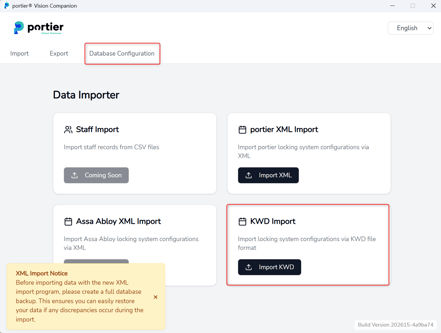
Approval Process Shortcut: A shortcut for the approval process has been added to the Daily Task menu, allowing it to be started directly from there.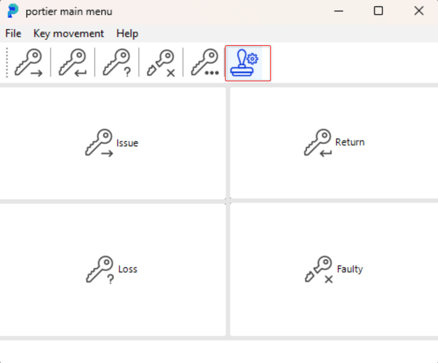
Password Management for Administrators: Administrators can now force a password reset for individual users. Additionally, the password expiry can now be set in days.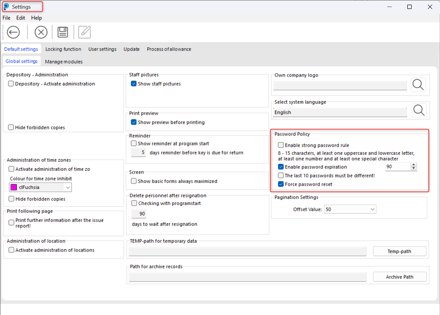
Reminder List Print Bug Fixed: A bug has been fixed that occurred when trying to print the reminder list.
General performance optimisations for system startup, switching between systems, and loading settings.
A splash screen is now displayed after startup, giving users better feedback on the loading progress.
03. Mar 2026
Share
Introduced Active Directory (AD) login validation during application startup
24. Feb 2026
Share
Fixed password save error when saving user data
Corrected password reset logic after 90 days
Updated and improved Companion
More details on the correct SQL Server connection:
Connecting portier Vision Companion to Microsoft SQL Server (Correct Host Configuration)
20. Feb 2026
Share
Fixed reminder list print reports
Optimized application performance (load time and saving settings)
Added configurable pagination offset values in Settings
Added batch update of exemplar status in the Search and Replace function
Added filter keys for unassigned depot in Search Query
Cylinder update via re-import of XML files
Companion enhanced: attempts database connection via TCP/IP, Named Pipes, or local connection
General improvements to portier Companion
12. Jan 2026
Share
ODBC driver is no longer required
ID cards can now be printed
General improvements and optimizations
28. Nov 2025
Share
Fixed: Users without the correct permissions were able to trigger reorders.
The permission check has been corrected and now works as intended.
Fixed: The Vision application automatically reset the service URL to portier-service.de on startup.
The configured URL now remains persistent and is no longer overwritten.
Various minor issues have been resolved to improve stability and performance.